

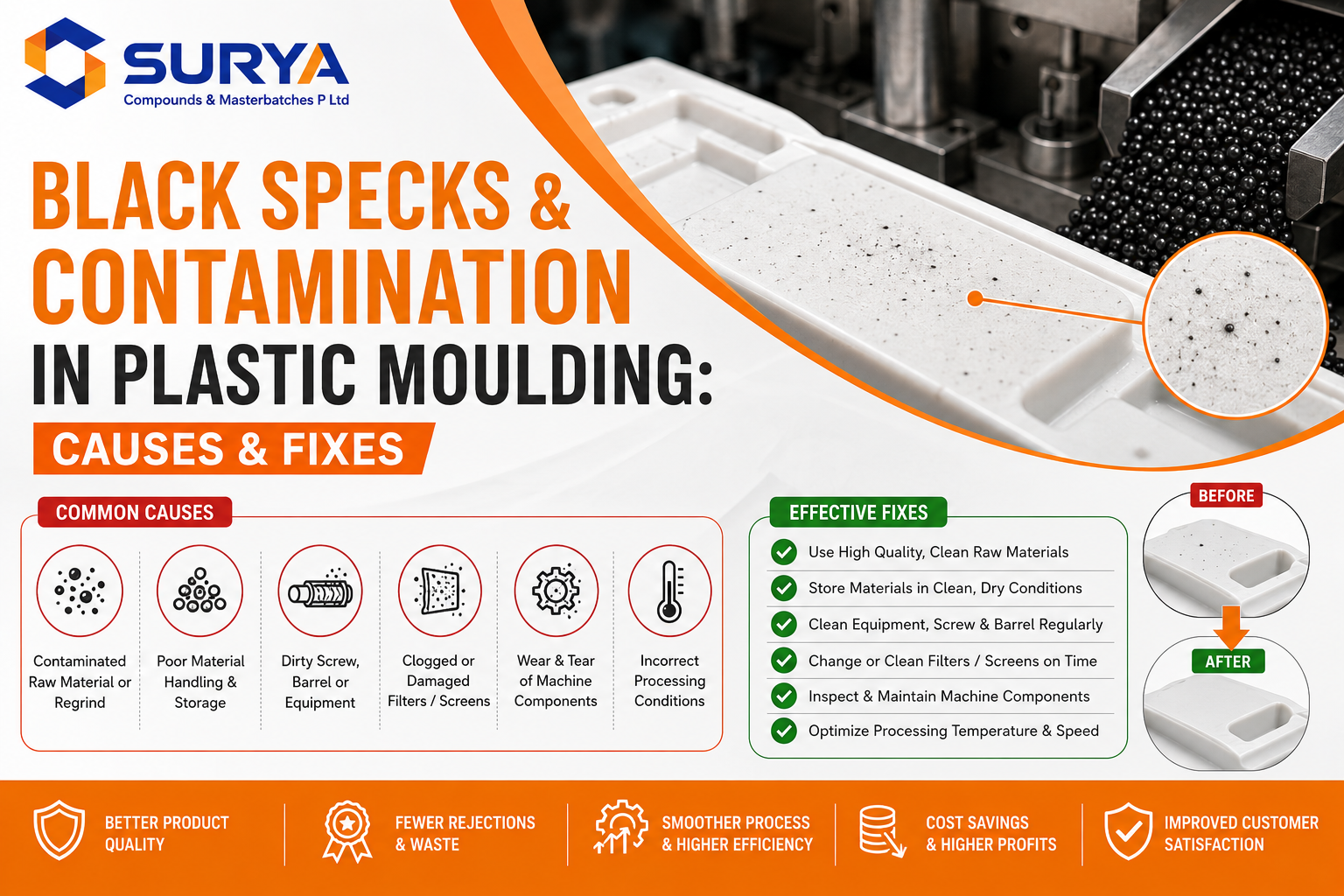
Black specks in plastic are small dark spots or particles that appear in molded or extruded parts. They are one of the most common quality complaints in plastics processing, and they push up reject rates because a single visible speck can fail a part on appearance alone. The good news is that black specks almost always come from a short list of causes—degradation, contamination, and machine build-up—and each has a clear fix. This guide explains why specks appear and how to remove and prevent them.
| Quick answer: Black specks are usually degraded polymer or carbon that has burned onto hot metal surfaces—barrel, screw, nozzle, or die — and then flaked into the melt, or foreign contamination in the raw material. Fix them by purging the machine, cleaning the screw and die, lowering residence time and temperature, and keeping material clean and dry. |
Why black specks cost more than they look
A speck is small, but its impact is not. In consumer and packaging products, appearance is part of the specification, so specks drive direct rejects and returns. In technical parts, a carbonized particle is a weak point that can act as a crack initiator under load. Beyond the scrapped parts, specks cost machine time: operators slow or stop the line to trace the source, purge, and re-qualify the output. Because the problem often comes and goes in bursts, it can also be frustrating to diagnose, which is why understanding the underlying mechanism — degradation and build-up — is the fastest route to a permanent fix rather than a temporary one.
What are black specks?
Black specks are dark contamination points in an otherwise clean part. They may be carbonised (burnt) polymer, degraded additive, or foreign matter such as dust, metal or a fragment of a different plastic. In black or dark-coloured parts they are easy to miss, but they still create a weak point in the material. In natural, white or light-coloured parts they are an obvious cosmetic defect that customers reject on sight. Either way, they signal that something in the material or the machine needs attention.
Common causes of black specks
Most specks trace back to one of the causes in the table below. Knowing which one you are dealing with points you straight to the fix.
|
Cause |
What happens |
|
Thermal degradation |
Polymer overheats and carbonises in hot zones |
|
Long residence time |
Material sits too long in the barrel and burns |
|
Die / screw build-up |
Degraded polymer bakes onto surfaces, then flakes off |
| Contaminated raw material |
Dust, dirt or foreign plastic in the feed |
| Cross-contamination |
Residue from a previous dark colour not purged out |
| Damaged screw or barrel |
Dead spots trap and degrade material |
| Regrind / recyclate |
Higher contamination and prior heat history |
Degradation and build-up are the biggest culprits, and they feed each other. When polymer sits too long at high temperature — because residence time is long, the barrel is oversized for the shot, or the material is heat-sensitive — it starts to carbonise. That burnt material bakes onto the screw, nozzle and die, then periodically breaks loose and flows out as specks. This is why specks often appear in bursts rather than steadily: a build-up reaches a critical size and sheds.
How to find the source of the specks
Before changing settings, work out where the specks are coming from. A few quick checks narrow it down fast. If the specks stop appearing shortly after a thorough purge and then return over time, the source is degradation and build-up inside the machine. If they are present from the very first shot after a clean material change, suspect contaminated raw material or regrind. If they cluster after a colour change from a dark shade, it is cross-contamination that was not fully purged. Examining a speck under magnification also helps: a shiny, hard particle is often foreign matter such as metal, while a matt, brittle particle that crushes to powder is usually carbonised polymer. This simple triage tells you whether to clean the machine, clean the feed, or change the material.
How to fix black specks — step by step
- Purge the machine thoroughly with virgin resin or a dedicated purging compound to clear degraded material from the melt path.
- Clean the screw, nozzle and die. If build-up is heavy, pull and clean the screw by hand and clear any dead spots where material can stagnate.
- Reduce the melt temperature to the minimum that still processes the polymer well, so degradation slows.
- Cut residence time. Right-size the barrel-to-shot ratio and avoid long holds at temperature, especially during stoppages.
- Check and clean the feed system — hopper, dryer and conveying lines — to remove dust and foreign matter before it enters the barrel.
- Dry the material properly so moisture does not accelerate thermal degradation during processing.
- Inspect the screw and barrel for wear or dead spots that trap and cook material; repair or replace worn components.
How to prevent black specks
A steady prevention routine keeps specks from coming back:
- Purge between colour and material changes, especially after dark shades, so residue does not carry into the next run.
- Keep raw material and regrind clean, dry and covered at every stage of handling.
- Use a quality masterbatch with heat-stable pigments and a clean carrier that does not char at your processing temperature.
- Maintain a regular cleaning schedule for screws, nozzles and dies rather than waiting for a problem.
- Add an antioxidant or thermal stabiliser where heat history is high, for example when running a high proportion of recyclate.
Conclusion
Black specks in plastic are usually a sign of polymer degradation, machine build-up, contamination, or poor material handling. The most effective approach is to identify the source first, then purge and clean the melt path, control temperature and residence time, and maintain clean, dry raw materials.
Using reliable masterbatch products from Surya Compounds & Masterbatches, with heat-stable pigments and compatible carriers, helps maintain consistent color and reduce processing defects. With regular machine maintenance, proper purging, controlled processing conditions, and good material practices, manufacturers can reduce black specks, lower rejection rates, and improve the overall quality of finished plastic products.
Frequently Asked Questions
What causes black specks in plastic parts?
Most black specks are degraded or burnt polymer that has built up on hot machine surfaces and then flaked into the melt, or foreign contamination in the raw material. Long residence time and high temperature make the problem worse.
How do I remove black specks from moulding?
Purge the machine with virgin resin or a purging compound, clean the screw, nozzle and die, lower the melt temperature, reduce residence time, and make sure the material is clean and dry before it enters the barrel.
Can masterbatch cause black specks?
A poor-quality masterbatch with heat-sensitive pigment or an unstable carrier can char at processing temperature and create specks. A well-made masterbatch with heat-stable pigments and a clean carrier reduces this risk.
Does regrind increase black specks?
Yes. Regrind carries extra contamination and prior heat history, so it is more prone to degradation. Keep it clean, limit the ratio in the blend, and consider adding a thermal stabiliser.
Why do black specks appear suddenly in bursts?
Because degraded material builds up on the screw, nozzle, or die until a deposit reaches a critical size and breaks loose all at once. Regular purging and cleaning prevent the build-up from forming.
